
TVALGO SIX Algo Oscillator for TradingView
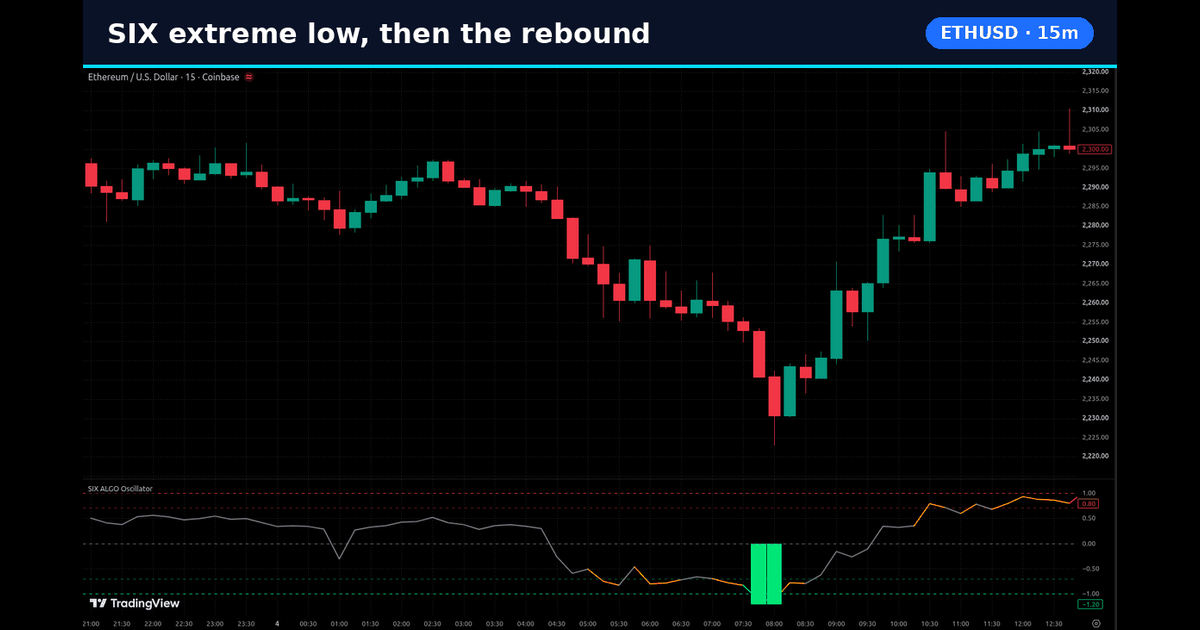
The SIX Algo Oscillator is TVALGO's flagship tool for TradingView: a colour-coded momentum oscillator. Green bars show buy pressure, red bars show sell pressure and orange bars mark potential reversal zones, with +1/−1 strong-zone levels. Alerts trigger on candle close. It is a chart-reading tool. It does not place trades for you, and you still confirm every reading with structure and your own risk rules.
What the SIX Algo Oscillator shows
SIX is built for one job: giving you cleaner context around extreme market zones without covering the chart in clutter. In TVALGO's own words, it highlights extreme-high conditions where momentum may be weakening and a move may be becoming stretched, and it helps TradingView users study extreme zones, momentum shifts and potential turning areas.
- Green bars: buy pressure.
- Red bars: sell pressure.
- Orange bars: potential reversal zones.
- +1/−1 levels: strong-zone levels that frame an extreme high or an extreme low.
Read an extreme as context, not as an automatic entry. If you want the background on how momentum and trend strength differ, see momentum vs trend strength on TradingView and overbought vs oversold extreme market zones.

Candle-close alerts: what TVALGO states
TVALGO states that SIX Algo Oscillator does not repaint. Its alerts trigger only when the candle closes. In practice, that means an alert refers to a finished candle, not to a reading that is still forming mid-bar.
You can still see the oscillator move while a candle is open, because price is still moving. Treat the closed candle as the reading you act on, and judge open-candle movement as awareness only. For a plain explanation of what repainting is and how to check any tool yourself, read what repainting means on TradingView.
A practical reading checklist
- Set your chart timezone to the zone you trade in (PKT for Pakistan sessions, UK time for London hours).
- Note where price sits when an extreme prints: at a swing high, a swing low or in the middle of a range.
- Wait for the candle to close before you treat the reading as final.
- Check higher-timeframe structure before you act on a lower-timeframe extreme.
- Keep the chart simple. Do not stack three similar oscillators; keep only what you can explain.
Common mistakes when reading extremes
The most frequent mistake is treating the first flash of an extreme on an open candle as a finished decision. Another is stacking RSI, Stochastic and SIX together until the pane is unreadable. A third is ignoring the session: an extreme into a scheduled high-impact release is a different environment from an extreme in a quiet hour. Keep a short journal with the symbol, timeframe, session and what price did after the candle closed.
If you mainly want BUY and SELL markers on the chart, read TradingView buy and sell signals explained first, so you know what any signal can and cannot tell you.
Pakistan, UK and multi-market use
SIX is a chart tool, not a broker. You can apply it to the forex, gold, index and crypto symbols your TradingView plan loads, whether you trade from Pakistan (PKT), the UK or elsewhere. Session context still matters: an extreme during a thin Asian hour can behave differently from one during the London–New York overlap.
How SIX sits with the other four tools
Every TVALGO plan includes all five TVALGO tools for TradingView: SIX Algo Oscillator, Market Predator, Bottom Killer, Sweeper Algo and Quantum Forge.
- Bottom Killer: a long-only oversold reversal tool. It marks potential buy areas when RSI drops below your oversold level.
- Sweeper Algo: a market-sweep tool with BUY/SELL markers. It looks for market sweeps and strong price displacement.
- Quantum Forge: a rule-based tool with a Long/Short/Both direction filter that acts only when its conditions are met.
- Market Predator: highlights key reaction zones and plots BUY and SELL signals with built-in filtering. Use it with your own confirmation.
Plans and full prices are on tvalgo.com/pages/pricing: Daily Access £2/day, Monthly Access £49/month, 6 Month Access £249/6 months, Yearly Access £399/year. Every plan includes the same five tools.
How to add it on TradingView
Enter your exact TradingView username during purchase. Access is added to your TradingView username within 12 hours of successful payment and username validation. Granted tools then appear in TradingView under Indicators → Invite-Only Scripts. Spelling and capitalisation of the username must match. If a tool is missing, check the username on your TVALGO account and follow how to add Invite-Only Scripts.
What it does not do
- It does not place trades or manage positions for you.
- It does not replace risk management or a written plan.
- It is not financial advice.
FAQ
Is the SIX Algo Oscillator an automated trading system?
No. It is a colour-coded momentum oscillator for chart reading on TradingView. It does not execute trades for you.
Does SIX Algo Oscillator repaint?
TVALGO states that SIX Algo Oscillator does not repaint, and its alerts trigger only when the candle closes. Check how any tool behaves on your own charts before you rely on it.
Does "does not repaint" mean better results?
No. Repainting is about whether markings change after a candle closes. It says nothing about results.
Can I use SIX on XAUUSD and other markets?
If the symbol loads on your TradingView layout, you can add the tool. Session hours and liquidity for that market still matter.
How many tools come with a TVALGO plan?
Every plan includes all five TVALGO tools for TradingView. See the pricing page for full prices and billing periods.
To review plans and access steps, start at tvalgo.com.
Trading involves risk. TVALGO tools are for chart analysis and are not personalised financial advice. TVALGO is an independent company and is not affiliated with TradingView.